Skip to content

初始化與終止系統

本模組以操作流程角度整理初始化、登入、started task,以及終止 z/OS 系統時常見的命令、回應與判讀重點。

學習重點

  • 練習辨識系統啟動過程中常見訊息與 operator response。
  • 理解登入與 started task 對系統可用性的影響。
  • 整理關機與終止流程中的順序、命令與確認事項。

核心術語

  • Operator command
  • Started task
  • Log on
  • Shutdown
  • IPL

學習內容

13內容頁
13靜態圖像頁
0圖像補充說明頁

課程導入

Page 1內容頁1 張圖像162 字元

Initializing and Terminating the System - Initializing and Terminating the System
Initializing and Terminating the System Initializing and Terminating the System - Initializing and Terminating the System screenshot
Initializing and Terminating the System (content)
課程正文

初始化與終止系統 模組

繼續使用本課程教材即表示您同意這些條款與條件。Interskill Learning Pty. Ltd. © 2024

學習檢核
  • 能用自己的話說明「Initializing and Terminating the System」在本 topic 中的用途。
  • 能判斷本頁內容應回到哪一個大型主機工作情境中使用。
Page 2內容頁1 張圖像388 字元

Initializing and Terminating the System - Objectives

Initializing and Terminating the System Initializing and Terminating the System - Objectives screenshot
Objectives (content)
課程正文

目標:初始化與終止系統

本單元將討論系統初始化與終止期間常用的指令。

完成本單元後,您應該能夠:

  • 在初始化期間回應系統訊息
  • 在受保護的主控台登入
  • 啟動 Started Tasks
  • 終止 Started Tasks 並記錄統計資料以完成系統關機
學習檢核
  • 能用自己的話說明「Objectives」在本 topic 中的用途。
  • 能判斷本頁內容應回到哪一個大型主機工作情境中使用。

初始化系統

Page 3圖像內容頁1 張圖像487 字元

Initializing and Terminating the System - Initializing the System

Initializing and Terminating the System Initializing the System: Initializing and Terminating the System - Initializing the System screenshot
Initializing the System (html-wrapper)
課程正文

每個組織都力求一個順暢且無錯誤的運作環境。z/OS 與 IBM Z 處理器協助達成此目的的一種方式,是讓初始化程序的大部分能夠自動化。

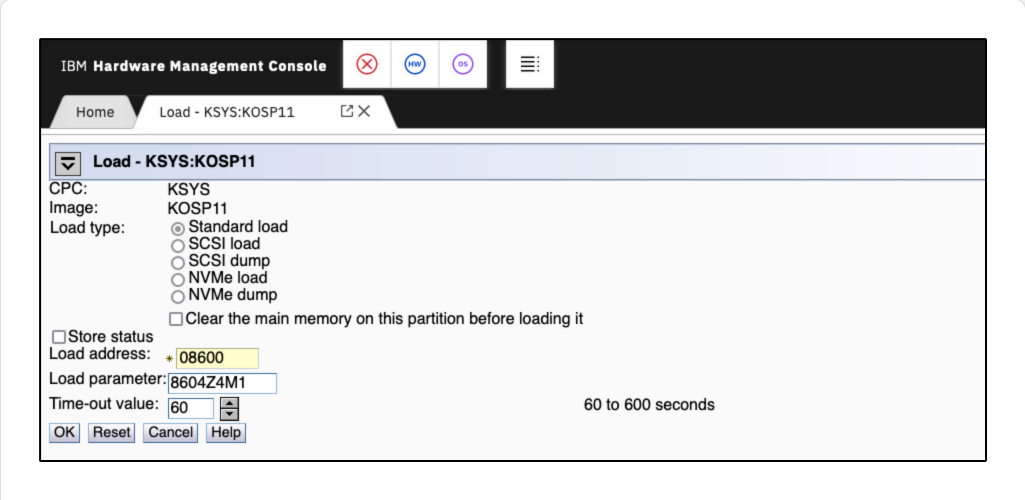
在先前的模組中,您已看到如何將載入詳細資料輸入到 Hardware Management Console (HMC),以指定目標系統應如何啟動。操作員接著會啟動 activate task,將所選系統帶到可運作的狀態。

HMC
學習檢核
  • 能用自己的話說明「Initializing the System」在本 topic 中的用途。
  • 能辨識 HMC 的基本角色。
  • 能判斷本頁內容應回到哪一個大型主機工作情境中使用。
Page 5內容頁1 張圖像1585 字元

Initializing and Terminating the System - Initializing the System

Initializing and Terminating the System Initializing the System: Initializing and Terminating the System - Initializing the System screenshot
Initializing the System (content)
課程正文

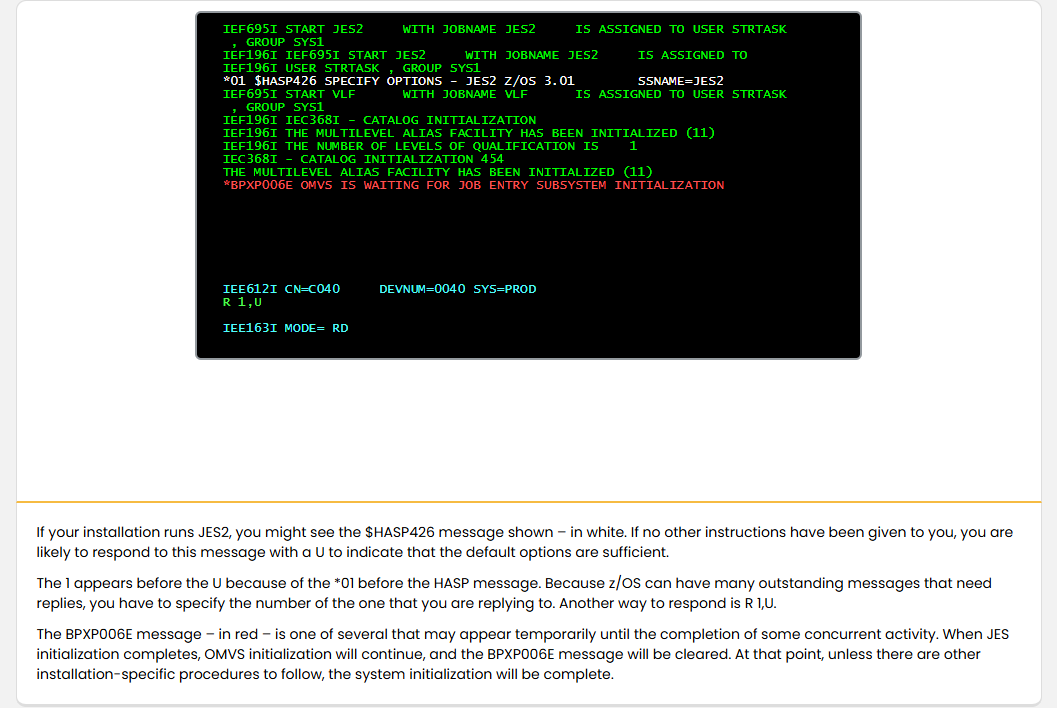
如果您的安裝環境執行 JES2,您可能會看到顯示的 $HASP426 訊息(白色)。如果沒有其他指示,您通常會以 U 回應此訊息,以表示預設選項已足夠。

1 出現在 U 之前,是因為 HASP 訊息前有 *01。由於 z/OS 可能有許多尚待回覆的訊息,您必須指定要回覆的訊息編號。另一種回應方式是 R 1,U。

BPXP006E 訊息(紅色)是數個可能暫時出現的訊息之一,直到某些同時進行的活動完成為止。當 JES 初始化完成後,OMVS 的初始化會繼續,而 BPXP006E 訊息將會被清除。到那時,除非還有其他安裝特定的程序需要執行,系統初始化即告完成。

SubsystemCatalogOMVSJES2
學習檢核
  • 能用自己的話說明「Initializing the System」在本 topic 中的用途。
  • 能辨識 Subsystem、Catalog、OMVS、JES2 的基本角色。
  • 能判斷本頁內容應回到哪一個大型主機工作情境中使用。
Page 6內容頁1 張圖像830 字元

Initializing and Terminating the System - Displaying IPL Information

Initializing and Terminating the System Initializing the System: Initializing and Terminating the System - Displaying IPL Information screenshot
Displaying IPL Information (content)
課程正文

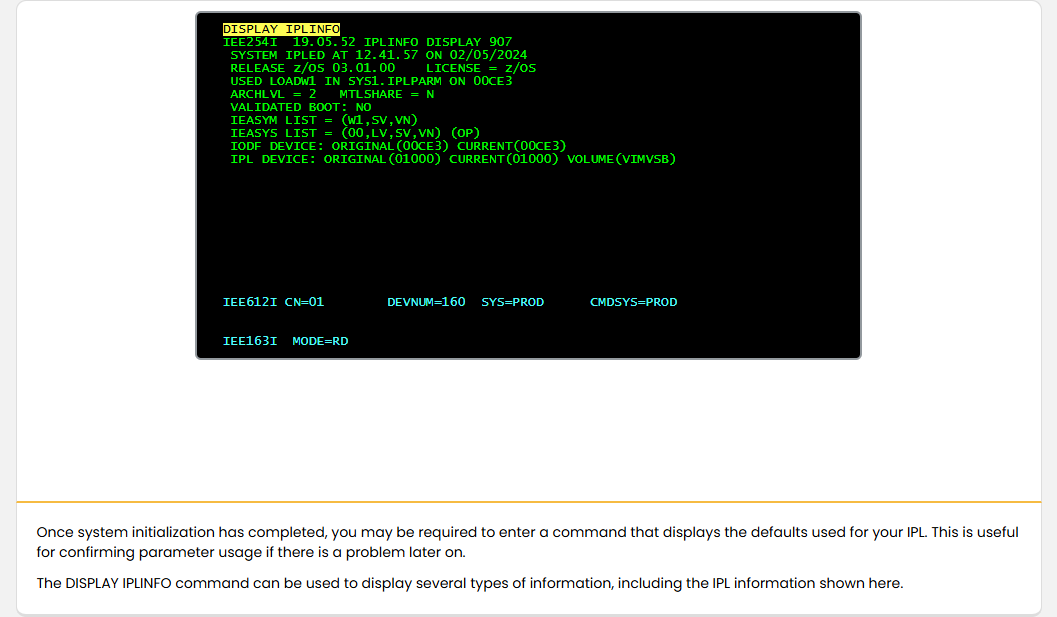
DISPLAY IPLINFO

系統初始化完成後,您可能需要輸入一個顯示用於 IPL 的預設值的指令。這在日後發生問題時,用來確認參數使用情況非常有用。

可以使用 DISPLAY IPLINFO 指令來顯示多種類型的資訊,包括此處所示的 IPL 資訊。

LOADxxIPL
學習檢核
  • 能用自己的話說明「Displaying IPL Information」在本 topic 中的用途。
  • 能辨識 LOADxx、IPL 的基本角色。
  • 能判斷本頁內容應回到哪一個大型主機工作情境中使用。

單元摘要

Page 21內容頁1 張圖像588 字元

Initializing and Terminating the System - Summary

Initializing and Terminating the System Quiz: Initializing and Terminating the System - Summary screenshot
Summary (content)
課程正文

摘要:初始化與終止系統

在本模組中,您已檢視在系統初始化與終止期間常用的指令,以及在初始化期間出現的訊息的回應方式。

您也檢視了受保護的主控台、started tasks 的啟動與終止,以及在系統關機完成時統計資料的記錄。

您現在應該能夠:

  • 在初始化期間回應系統訊息
  • 在受保護的主控台登入
  • 啟動 Started Tasks
  • 終止 Started Tasks 並記錄統計資料以完成系統關機
學習檢核
  • 能用自己的話說明「Summary」在本 topic 中的用途。
  • 能判斷本頁內容應回到哪一個大型主機工作情境中使用。

登入

Page 8內容頁1 張圖像310 字元

Initializing and Terminating the System - Logging On

Initializing and Terminating the System Logging On: Initializing and Terminating the System - Logging On screenshot
Logging On (content)
課程正文

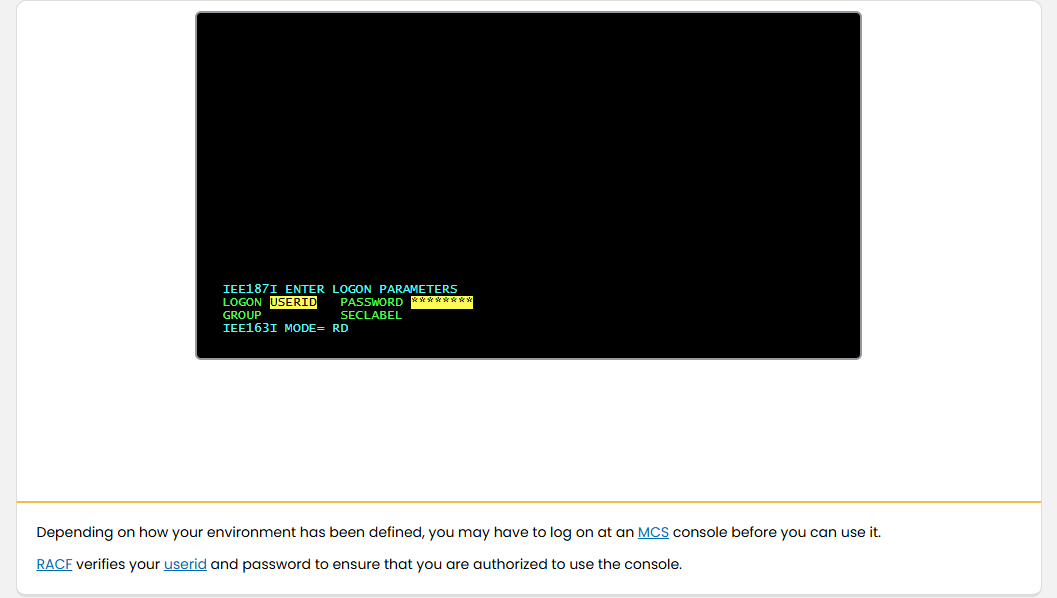
視您環境的定義,您可能必須先在 MCS 主控台登入,才能使用該主控台。

RACF 會驗證您的使用者 ID 和密碼,以確定您有權使用該主控台。

RACF
學習檢核
  • 能用自己的話說明「Logging On」在本 topic 中的用途。
  • 能辨識 RACF 的基本角色。
  • 能判斷本頁內容應回到哪一個大型主機工作情境中使用。

Started task

Page 11圖像內容頁1 張圖像338 字元

Initializing and Terminating the System - Started Tasks

Initializing and Terminating the System Started Tasks: Initializing and Terminating the System - Started Tasks screenshot
Started Tasks (html-wrapper)
課程正文

使用 START 指令 (S),可利用從程序庫讀取的型錄程序來啟動一個已啟動工作。

已啟動工作通常會在系統初始化時自動啟動,並在系統關機時停止。

許多子系統都是以已啟動工作方式啟動。

按一下 Play 可觀看已啟動工作的動畫。

Catalog procedureCatalog
學習檢核
  • 能用自己的話說明「Started Tasks」在本 topic 中的用途。
  • 能辨識 Catalog procedure、Catalog 的基本角色。
  • 能判斷本頁內容應回到哪一個大型主機工作情境中使用。
Page 12內容頁1 張圖像1602 字元

Initializing and Terminating the System - Started Tasks

Initializing and Terminating the System Started Tasks: Initializing and Terminating the System - Started Tasks screenshot
Started Tasks (content)
課程正文

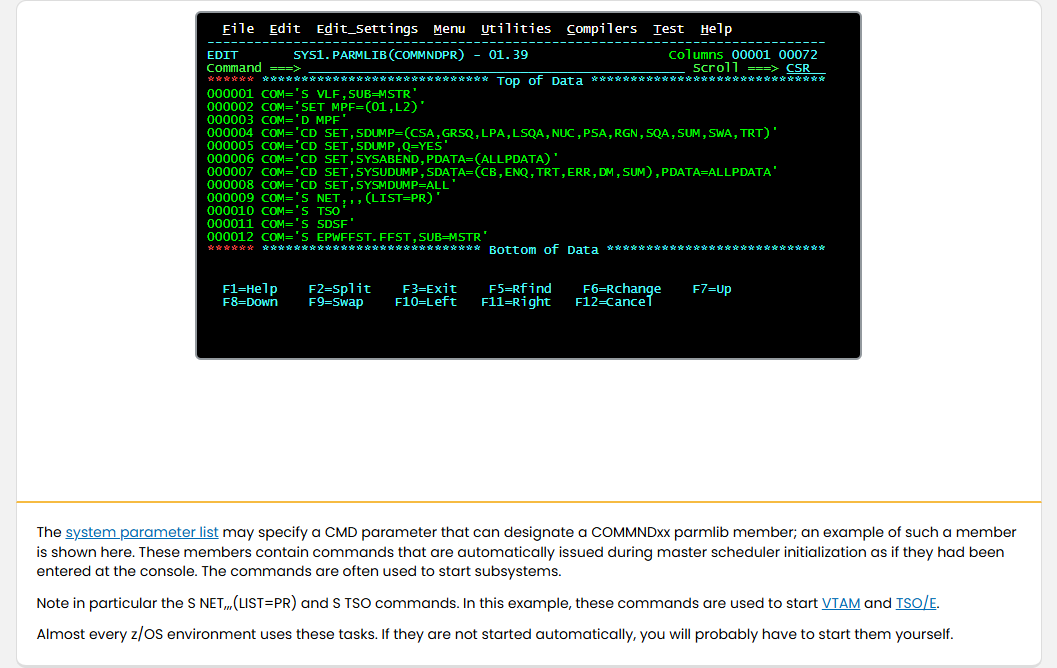
系統參數清單可能會指定一個 CMD 參數,可指向 COMMNDxx parmlib 成員;下面顯示此類成員的一個範例。這些成員包含的指令會在主排程程式初始化期間自動下達,就好像它們是在主控台輸入的一樣。這些指令常用來啟動子系統。

特別注意 S NET,,,(LIST=PR) 與 S TSO 指令。在此範例中,這些指令用來啟動 VTAM 與 TSO/E。

幾乎每個 z/OS 環境都會使用這些任務。如果它們沒有被自動啟動,您很可能需要自行啟動它們。

CSASQALPAPARMLIBMaster schedulerTSO/ESDSF
學習檢核
  • 能用自己的話說明「Started Tasks」在本 topic 中的用途。
  • 能辨識 CSA、SQA、LPA、PARMLIB 的基本角色。
  • 能指出畫面中應觀察的欄位、命令區、狀態列或清單。
  • 能判斷本頁內容應回到哪一個大型主機工作情境中使用。
Page 13圖像內容頁1 張圖像126 字元

Initializing and Terminating the System - Started Tasks

Initializing and Terminating the System Started Tasks: Initializing and Terminating the System - Started Tasks screenshot
Started Tasks (html-wrapper)
課程正文

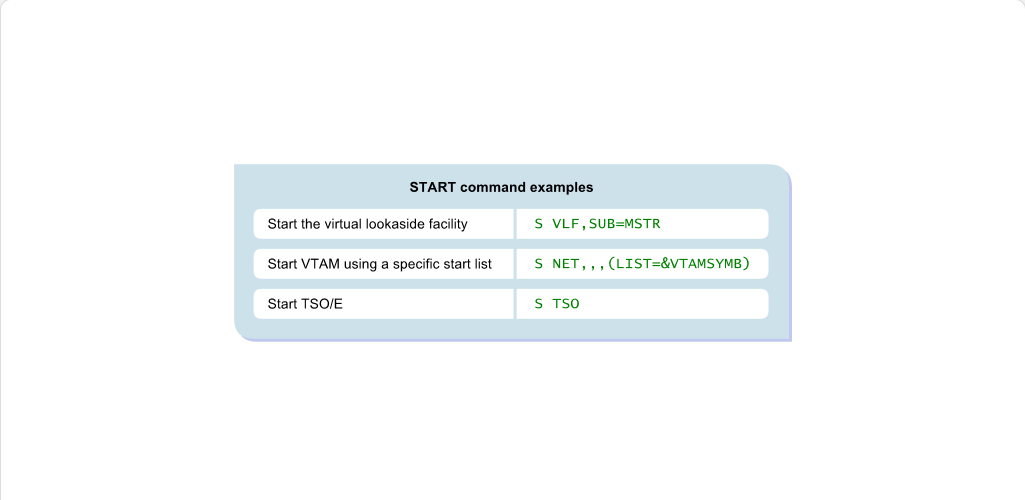
此處顯示一些 START 指令的範例。請留意 started task 的啟動語法,以及 operator 在系統初始化後可能需要輸入的命令。

TSO/EJES2
學習檢核
  • 能用自己的話說明「Started Tasks」在本 topic 中的用途。
  • 能辨識 TSO/E、JES2 的基本角色。
  • 能判斷本頁內容應回到哪一個大型主機工作情境中使用。
Page 15內容頁1 張圖像745 字元

Initializing and Terminating the System - Started Tasks

Initializing and Terminating the System Started Tasks: Initializing and Terminating the System - Started Tasks screenshot
Started Tasks (content)
課程正文

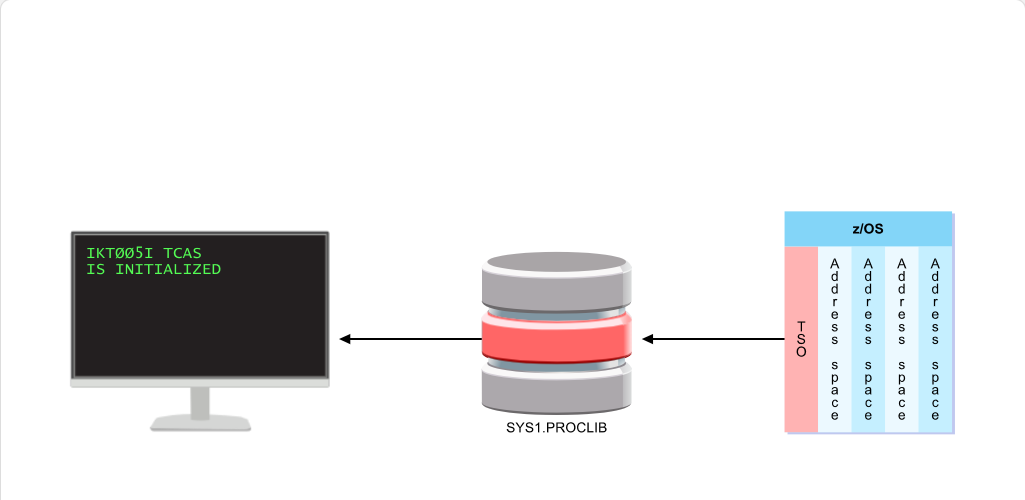
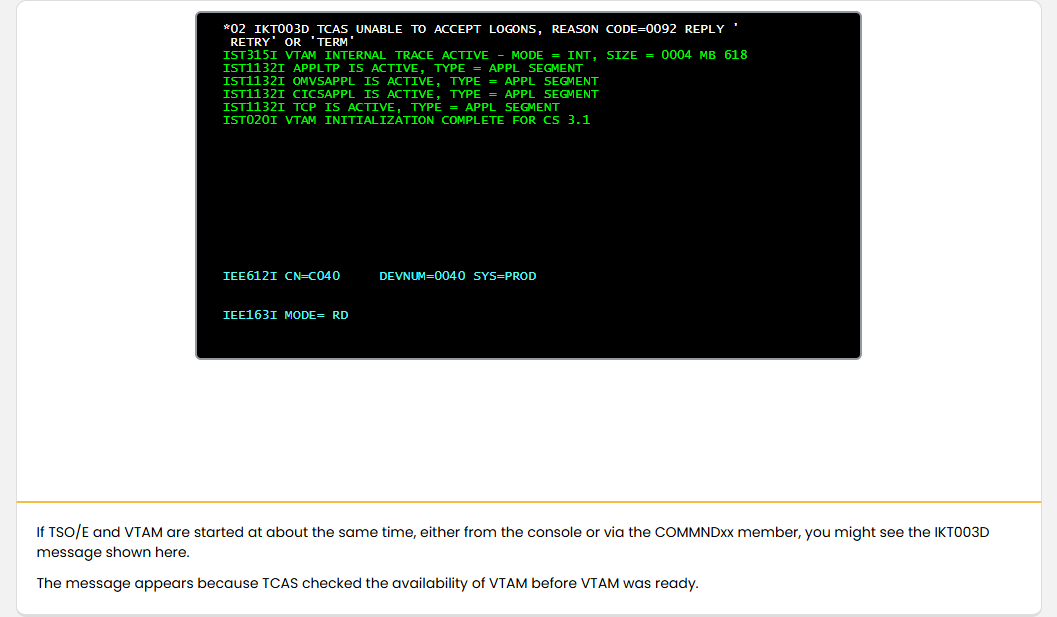
如果 TSO/E 和 VTAM 在差不多相同的時間啟動,無論是從控制台或透過 COMMNDxx 成員,你可能會看到如此處所示的 IKT003D 訊息。

此訊息出現是因為 TCAS 在 VTAM 尚未就緒之前,就已檢查 VTAM 的可用性。

TSO/E
學習檢核
  • 能用自己的話說明「Started Tasks」在本 topic 中的用途。
  • 能辨識 TSO/E 的基本角色。
  • 能判斷本頁內容應回到哪一個大型主機工作情境中使用。

終止系統

Page 18圖像內容頁1 張圖像625 字元

Initializing and Terminating the System - Terminating the System

Initializing and Terminating the System Terminating the System: Initializing and Terminating the System - Terminating the System screenshot
Terminating the System (html-wrapper)
課程正文

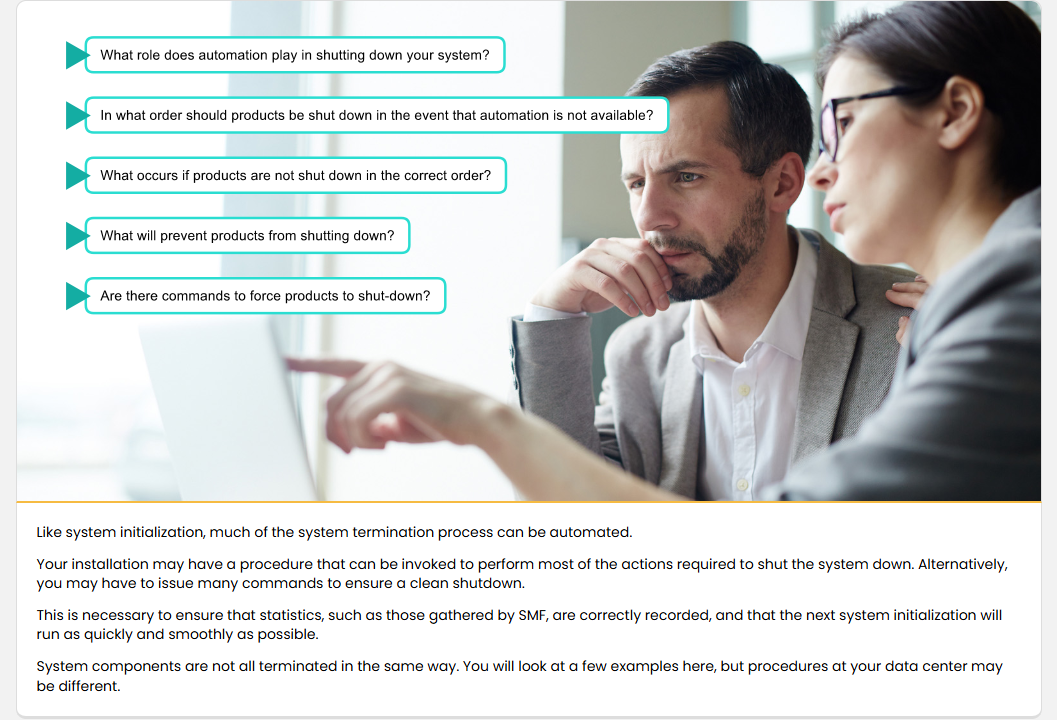
如同系統初始化,大部分系統終止流程也可以自動化。

您的安裝環境可能已有一個可呼叫的程序,能執行關機所需的大多數動作。或者,您可能必須發出許多指令以確保乾淨地關閉系統。

這樣做是為了確保像 SMF 所蒐集的統計資料能正確記錄,並讓下一次系統初始化能盡可能快速且順利地執行。

系統元件並非全部以相同方式終止。這裡會看幾個範例,但您的資料中心可能有不同的程序。

學習檢核
  • 能用自己的話說明「Terminating the System」在本 topic 中的用途。
  • 能判斷本頁內容應回到哪一個大型主機工作情境中使用。

模組完成

Page 24內容頁1 張圖像531 字元

Initializing and Terminating the System - Module Complete

Initializing and Terminating the System Module Test: Initializing and Terminating the System - Module Complete screenshot
Module Complete (content)
課程正文

模組完成:系統的初始化與終止

您可以按一下 'Exit' 離開「系統的初始化與終止」並記錄您的結果,或使用 'Table of Contents' 返回並檢視本模組。

若要再次參加「系統的初始化與終止」模組測驗,您需要先離開模組,然後從 LMS 重新參加測驗。

注意:為確保您的結果正確儲存,請使用本訓練視窗右上角的 'Exit' 按鈕。請勿使用瀏覽器右上角的 'X'。

學習檢核
  • 能用自己的話說明「Module Complete」在本 topic 中的用途。
  • 能判斷本頁內容應回到哪一個大型主機工作情境中使用。

練習

本模組的 practice quiz 與 module test 題目已整理到非計分練習頁。本站不寫回分數、attempt、completion 或 certificate;正式紀錄仍以 YourLearnings / InterSkill 為準。

前往練習題

IBM Z course transfer site for Taiwan enablement.